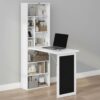
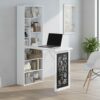
HOMCOM Wall Mounted Computer Desk
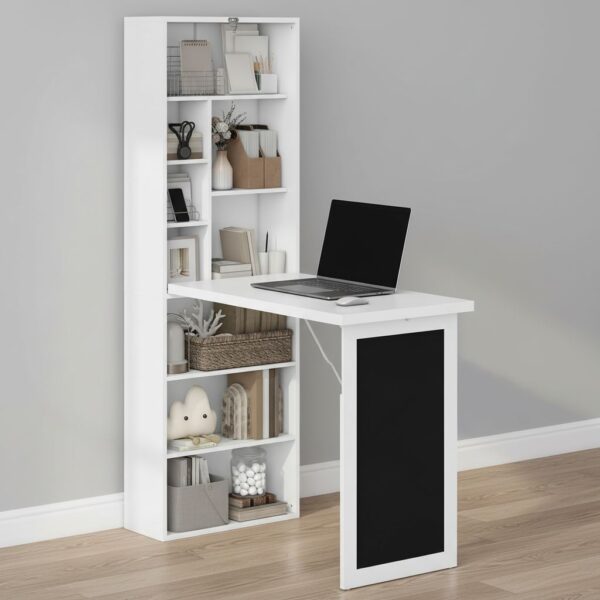
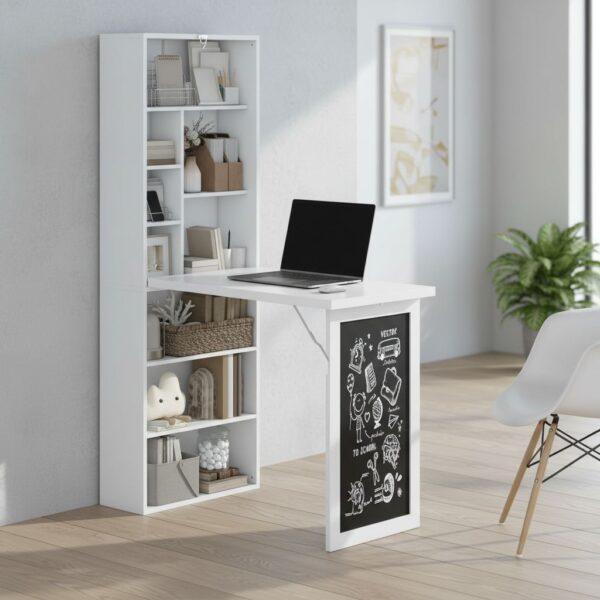
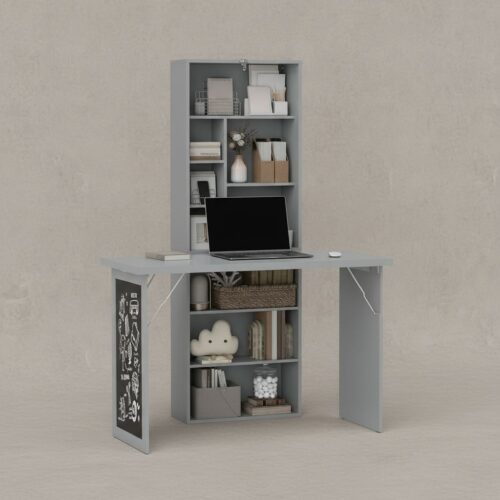
HOMCOM HOMCOM Wall Mounted Computer Desk is designed for compact living and flexible home working, combining a wall-mounted workstation with built-in storage. By fixing the unit to the wall and using a fold-down work surface, it keeps the floor area clear when the desk is not in use, which is particularly useful in studios, box rooms, or multi-purpose spaces where the same corner needs to switch between work, study, and everyday living.
Key characteristics of HOMCOM Wall Mounted Computer Desk
- Wall-mounted design helps keep floor space open and uncluttered
- Fold-down work surface supports quick change between tasks and storage
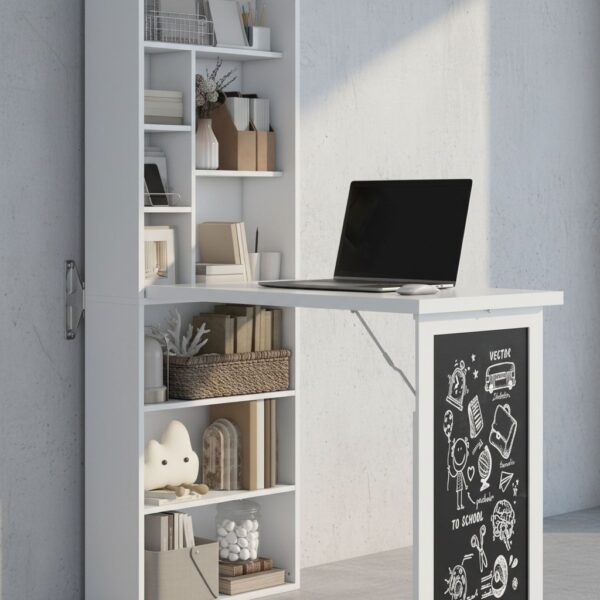
- Built-in black board area for notes, reminders, and planning
- Nine open compartments organise stationery, books, and small accessories
- Adjustable shelf helps tailor storage height to everyday items
Overview of HOMCOM Wall Mounted Computer Desk
As a Wall Mounted Computer Desk, the structure prioritises vertical organisation. The storage section sits above the working zone, so frequently used items can remain within arm’s reach without covering the writing surface. Open compartments are practical for visibility and routine habits: notebooks, chargers, and small boxes can be placed consistently, reducing time spent searching and helping the space feel calmer.
When used as a floating writing station, the fold-down panel supports short-to-medium sessions like laptop work, homework, or paperwork. Folding the surface away is not just a space-saving trick; it also changes how the room functions ergonomically. A closed desk discourages leaving items spread out, which can be helpful in shared homes where the same room needs to look tidy outside working hours.
Benefits of HOMCOM Desk
The main practical advantage of a HOMCOM Wall Mounted Desk is reclaiming usable floor area. In smaller rooms, a conventional desk often dictates layout and limits movement. A wall-mounted unit allows seating to be brought in only when needed, and it can reduce the feeling of visual “bulk” that comes with full-depth furniture.
From an ergonomics standpoint, the work surface is best thought of as a focused station rather than an all-day executive desk. For comfortable use, it helps to pair the desk with a chair that supports an upright posture, keeping shoulders relaxed and wrists neutral while typing or writing. Because the storage sits above, the most frequently used items should be stored in the easiest-to-reach compartments to minimise repeated overhead reaching during work blocks.
The integrated black board is a simple but effective planning feature. Placing reminders at eye level reduces mental load, and it can support better workflow habits: quick to-do lists, deadlines, or a daily timetable can be kept visible without taking up desk space. In a household setting, it also works for shared messages, shopping notes, or children’s reminders.
Storage is where the design becomes more than a fold-down table. Nine open compartments encourage zoning: one for pens and stationery, one for cables and adapters, one for current reading, and so on. This is a practical way to prevent the work surface from becoming the default storage area, which is often the main reason small desks feel cramped.
Materials and construction of HOMCOM Desk
HOMCOM Wall Mounted Computer Desk relies on a wall-fixed installation, so stability depends on two things: correct mounting and an appropriate wall type. A secure fix keeps the work surface feeling consistent when writing or typing, and it reduces the small vibrations that can happen if fixings are under-specified for the wall material. For best results, the unit should be installed level so the fold-down surface aligns properly and closes neatly.
In daily use, the fold-down mechanism benefits from a simple routine: open and close the panel smoothly rather than letting it drop, and avoid placing items that could interfere with the closing path. The shelving area is designed for typical desk essentials; distributing items across compartments helps keep the overall load balanced and makes the unit feel more composed visually.
The open-compartment layout is also practical from a durability perspective, because items can be removed without dragging them across edges. Using small organisers or trays inside the compartments can further reduce wear from repeated movement of hard objects like staplers, chargers, or metal stationery.
How to use this Desk
Start by setting the workstation up around the tasks it will handle most often. For a HOMCOM Computer Desk Wall Mounted arrangement, the most effective approach is to keep the fold-down surface as the “active zone” and the compartments as the “support zone”. That means the worktop stays clear except for the current task, while the storage holds items that are needed frequently but not constantly.
For study sessions, keep reference books and notebooks in the upper compartments and rotate only what is needed onto the surface. For laptop use, consider leaving a clear space for ventilation and keeping cables routed so they do not snag when closing the panel. If the black board is used daily, placing a small piece of chalk and an eraser in a dedicated compartment prevents clutter and keeps the planning feature genuinely convenient.
To maintain a comfortable working posture, position the chair so elbows can rest near a right angle when typing or writing. If the desk is installed in a shared area, a simple end-of-session routine helps: store the laptop and accessories, wipe the surface, and fold the panel back up. This keeps the room visually calm and makes it easier to start the next session without reorganising.
Technical specifications of HOMCOM Wall Mounted Computer Desk
| Feature |
Details |
| Brand |
HOMCOM |
| Product category |
Office |
| Format |
Desk |
Frequently asked questions about HOMCOM Wall Mounted Computer Desk
HOMCOM Wall Mounted Computer Desk is a wall-fixed, fold-down desk designed to keep a work surface available without permanently taking up floor space. Because it combines a writing area with integrated storage, it is typically chosen for compact home offices, bedrooms, or study corners where circulation space matters. The questions below focus on day-to-day use, wall installation considerations, ergonomics, and practical care so the desk stays stable, comfortable, and tidy over time.
How do you use HOMCOM Wall Mounted Computer Desk day to day?
Use it like a fold-down workstation: open the front writing surface when needed, then close it to clear the room when finished. Set frequently used items in the open compartments so the worktop stays uncluttered, which improves forearm support and mouse control. If the model includes a blackboard area, reserve it for quick notes or reminders rather than heavy pressure. For comfortable use, pair the desk with a chair at a height that keeps elbows roughly level with the work surface and feet supported.
Is the Wall Mounted Computer Desk easy to install securely on the wall?
Installation is straightforward for an experienced DIYer, but wall type is the deciding factor for security. The desk must be fixed into a solid, load-bearing structure (such as studs or masonry) using appropriate fixings for that wall, not just for plasterboard alone. Accurate leveling matters so the fold-down surface opens and closes smoothly and sits flat. Before drilling, confirm the final height suits the intended chair and user; a desk mounted too high quickly causes shoulder elevation and fatigue.
How much weight can the HOMCOM Desk hold when it’s open?
Specific load limits depend on the manufacturer’s specification for this exact unit and the quality of the wall anchoring, so it is best to follow the product manual once available. In practical terms, a wall-mounted fold-down desk is intended for typical study and light computer tasks rather than heavy equipment. Keep the heaviest items in the storage compartments only if they are designed for it, and avoid leaning body weight on the open work surface, which increases torque on the wall fixings.
What are the storage compartments on the Desk best used for?
The open compartments are most effective for lightweight, frequently accessed items: notebooks, stationery, small tech accessories, and letter-sized documents. Distribute items evenly so one side is not consistently overloaded, which can make the desk feel unbalanced in daily use. If a shelf is adjustable, set the height to prevent tall items from interfering with the fold-down mechanism. Keeping the work surface clear also helps ergonomics: it allows the keyboard and mouse to sit in a neutral position without forcing wrists to bend around clutter.
Is HOMCOM Wall Mounted Computer Desk by HOMCOM comfortable for longer study sessions?
Comfort depends on mounting height, chair fit, and how the work surface is used. For longer sessions, the goal is a neutral posture: shoulders relaxed, elbows near the body, wrists straight, and the screen at a height that avoids neck flexion. If using a laptop, consider a separate keyboard and mouse so the screen can be raised without lifting the hands. Because this is a wall-mounted, space-saving format, it is especially important to plan cable routing and leg clearance to avoid awkward sitting positions.
What dimensions should be checked before choosing HOMCOM Wall Mounted Desk?
Even without exact measurements listed here, three checks prevent most fit issues. First, confirm the open depth provides enough space for a laptop and forearm support; shallow desks can push the user too close to the screen. Second, measure the closed projection from the wall so it does not interfere with doors, walkways, or furniture. Third, verify the mounting height relative to the chair: a mismatch leads to raised shoulders or cramped knees. Also consider the wall area needed for the unit plus comfortable seating space in front.
How should the HOMCOM Computer Desk Wall Mounted be cleaned and maintained?
Use a soft, slightly damp cloth for routine cleaning, then dry the surfaces to reduce moisture exposure at edges and joints. Avoid abrasive pads and harsh solvents that can dull finishes. Periodically check the wall fixings and hinge points for any loosening, especially if the desk is opened and closed frequently; re-tighten hardware as needed according to the manual. Keep the fold-down mechanism free of debris so it closes flush. If a blackboard surface is present, use chalk suitable for the board and wipe it gently to prevent residue buildup.
User experience with HOMCOM Wall Mounted Computer Desk
HOMCOM Wall Mounted Computer Desk viene descritto dagli utenti come una soluzione pratica per ricavare un’area studio o lavoro dove lo spazio è limitato. La percezione ricorrente è quella di una scrivania “quando serve”: si utilizza per attività leggere come laptop, lettura, gestione documenti e compiti, e poi si richiude per liberare passaggi e metri quadri. Nei commenti emerge spesso l’apprezzamento per l’approccio a parete, che riduce l’ingombro a pavimento e rende più facile mantenere l’ambiente ordinato. In parallelo, diversi utenti sottolineano che la resa finale dipende molto da una corretta installazione e dalla scelta della parete, perché stabilità e comfort d’uso sono strettamente legati al fissaggio e all’altezza di montaggio.
Nel complesso, la soddisfazione tende a essere più alta quando la scrivania viene interpretata come postazione compatta e flessibile, più che come scrivania principale per sessioni lunghe o carichi importanti. La presenza di vani aperti e di un ripiano regolabile viene vista come un vantaggio per organizzare materiale di uso quotidiano, mentre la funzione pieghevole è citata come elemento chiave per monolocali, camere piccole e angoli studio ricavati in corridoi o soggiorni.
Main strengths reported for HOMCOM Wall Mounted Computer Desk
- Risparmio di spazio percepito come concreto: da chiusa riduce l’ingombro e aiuta a mantenere l’area più libera, soprattutto in stanze multifunzione.
- Organizzazione immediata: i comparti aperti vengono spesso usati per libri, quaderni, cancelleria e piccoli accessori, con il vantaggio di avere tutto a portata senza aggiungere mobili extra.
- Postazione “pronta all’uso”: apertura e chiusura considerate comode per routine quotidiane (studio, email, gestione bollette), con beneficio particolare per chi non vuole una scrivania sempre in vista.
Perceived strengths
- Buona integrazione in ambienti piccoli: il concetto di scrivania a parete viene apprezzato perché libera spazio a terra e permette di collocare sedie leggere o sgabelli che si spostano facilmente.
- Versatilità d’uso: il Wall Mounted Desk viene associato a più scenari, come angolo compiti per ragazzi, punto appoggio per smart working occasionale o piccola stazione creativa per hobby leggeri.
- Capacità di “ridurre il disordine”: molti utenti notano che i vani aiutano a dare una collocazione fissa agli oggetti, migliorando la percezione di ordine rispetto a piani d’appoggio improvvisati.
Usage nuances to consider
- Installazione determinante: la riuscita dipende da parete, tasselli e montaggio corretto. Nei riscontri ricorrenti si consiglia di valutare con attenzione il tipo di muratura e di controllare l’allineamento, perché una posa imprecisa può influire su stabilità e comfort.
- Aspettative sul carico e sull’uso: viene spesso interpretata come scrivania compatta per attività leggere; chi prevede carichi elevati o movimenti intensi (ad esempio spinta sul piano, attrezzature pesanti) tende a ottenere risultati migliori se pianifica un utilizzo più “misurato” e una seduta adeguata.
Who tends to benefit most from HOMCOM Wall Mounted Computer Desk?
La HOMCOM Desk risulta particolarmente adatta a chi vive in spazi ridotti o in case dove la stessa stanza deve svolgere più funzioni (soggiorno che diventa studio, camera che diventa area compiti). In base alle esperienze riportate, ne beneficia chi cerca una postazione per sessioni brevi o intermittenti: lezioni online, compiti, consultazione di documenti, lavoro al computer non continuativo. È inoltre una scelta frequente per chi desidera un punto organizzato per materiale scolastico o di cancelleria senza aggiungere una libreria separata, sfruttando i vani aperti come micro-archivio quotidiano. Dal punto di vista ergonomico, la soddisfazione aumenta quando l’altezza di installazione viene calibrata sulla seduta e sulla statura di chi la usa più spesso, così da ridurre l’affaticamento di spalle e polsi durante digitazione e scrittura.
Nei commenti ricorre l’idea di una postazione ordinata e discreta: utile quando serve e “invisibile” quando non si usa.