HOMCOM Desk Chair
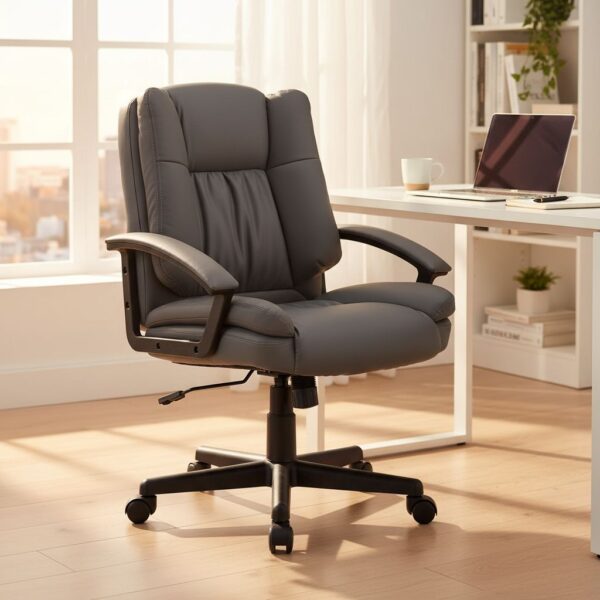
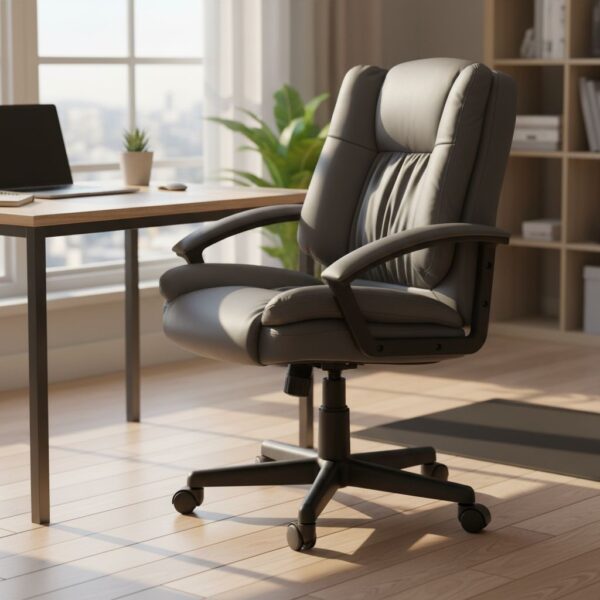
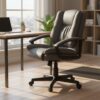
HOMCOM Desk Chair is designed for everyday home working and study setups where adjustability and easy movement matter. The chair combines PU leather upholstery with a cushioned seat and a wheeled base, aiming to keep posture changes simple during long periods at a desk.
Key characteristics of HOMCOM Desk Chair
- PU leather upholstery designed for straightforward wipe-clean maintenance
- Adjustable height supports better alignment with different desk heights
- Swivel wheels help reposition smoothly across typical home flooring
- Cushioned seat supports everyday work, study, and computer tasks
Overview of HOMCOM Desk Chair
As a Desk Chair by HOMCOM, this model focuses on the practical fundamentals that tend to influence comfort most: seat height adjustment, a supportive cushioned base, and mobility from a wheeled, swivel design. For many home offices, the goal is not a “locked-in” posture but the ability to make small, frequent changes—sliding closer to the desk, turning to reach storage, or adjusting sitting height to keep elbows and shoulders in a comfortable working position.
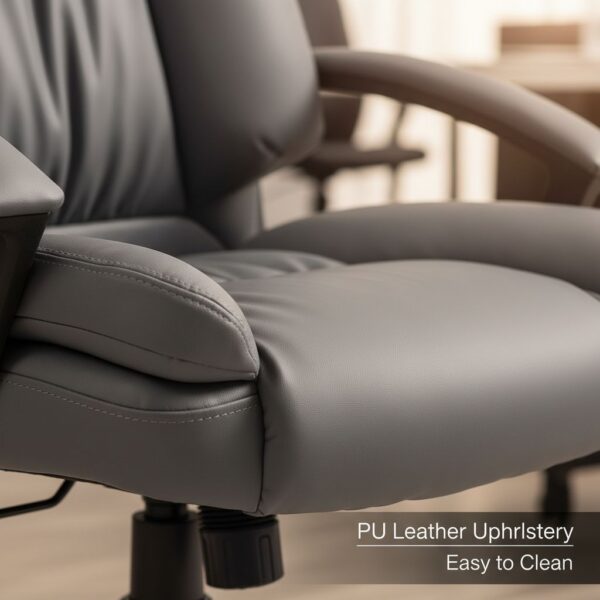
The PU leather surface is a common choice for desk seating because it tends to be easier to keep tidy than some woven fabrics. In a work-from-home context, that usually translates to quicker cleanups from everyday dust and minor spills, and less worry about the chair looking worn from regular use.
In use, the HOMCOM Desk Chair is meant to feel straightforward: sit down, set the height, and let the chair move with the task. That simplicity matters ergonomically, because a chair that is easy to adjust is more likely to be adjusted—supporting better day-to-day posture habits over time.
Benefits of HOMCOM Chair
A core benefit of a HOMCOM Chair in this format is height adjustability. From an ergonomics standpoint, seat height is often the first lever to pull: when the seat is set correctly, feet can rest more naturally and the pelvis is less likely to tilt awkwardly. This helps reduce the tendency to perch on the edge of the seat or to slouch to reach the keyboard.
Mobility is the next practical advantage. A chair that swivels and rolls can reduce repeated twisting through the spine when reaching for items around the workstation. Instead of rotating the torso against resistance, the body can reposition with the chair, which is typically more comfortable during repetitive tasks like switching between a laptop, notes, and a second screen.
For day-to-day comfort, the cushioned seat plays a simple but important role: it spreads pressure more evenly across the sitting surface. While no chair can replace good movement habits, a properly cushioned base can make common desk sessions—emails, reading, online classes, and general computer work—feel less fatiguing.
Finally, the PU leather finish supports a “low-fuss” routine. For many households, a chair that can be wiped down quickly is easier to keep in regular rotation, especially in shared spaces where the same seat may be used for work, homework, and general computer time.
Materials and build approach of HOMCOM Chair
The upholstery on this HOMCOM Chair Desk is PU leather. In furniture terms, PU leather is often chosen for its smooth hand-feel and straightforward upkeep. It typically suits work areas because it does not trap dust as easily as some textured fabrics, and it can be cleaned without specialist products in most everyday situations.
The chair’s comfort is largely driven by the relationship between the cushioning and the seat surface. A slightly yielding cushion helps absorb micro-movements as posture shifts throughout the day—leaning in to type, sitting back to read, or turning to speak to someone nearby. This matters because static sitting tends to increase perceived discomfort; a chair that accommodates small posture changes can feel more forgiving over time.
Functionally, the wheeled base supports typical desk movements: pulling in, pushing out, and repositioning for different tasks. From a home ergonomics perspective, wheels can be especially helpful when the workstation is not a dedicated office—such as a desk in a bedroom or a study corner—where the chair may need to move aside easily after use.
Colour is listed as dark grey in the product title, which usually pairs well with a range of home interiors and reduces the visibility of everyday marks compared with very light finishes. That can be a practical detail in busy households where the chair is used frequently.
How to use this Chair
Start by setting the chair height so that the workstation feels “reachable” without lifting the shoulders. A useful reference point is keeping forearms comfortable and relaxed while typing, with the desk surface not forcing the elbows to flare outward. If the desk is high, raising the chair can help; if the desk is low, lowering the seat can reduce shoulder tension.
Next, position the chair so the body can sit back rather than perching forward. With a Desk Chair, it is common to creep toward the screen over time; periodically rolling the chair slightly closer and sitting back can reduce the tendency to round the upper back and crane the neck.
Use the swivel and wheels to move the whole body rather than twisting at the waist. For example, when reaching to a side shelf or turning to speak to someone, letting the chair rotate with the movement is typically easier on the spine than repeatedly twisting against a fixed seat.
For upkeep, keep the PU leather surface free of grit and dust that can act like abrasion over time. In most home settings, a soft cloth and gentle cleaning approach are enough to maintain the finish and keep the chair looking consistent with the rest of a tidy workstation.
Technical specifications of HOMCOM Desk Chair
| Feature |
Details |
| Brand |
HOMCOM |
| Product category |
Office |
| Product format |
Chair |
Frequently asked questions about HOMCOM Desk Chair
HOMCOM Desk Chair is designed as a compact office chair for home work or study, with PU leather upholstery, adjustable height, and swivel wheels. For day-to-day ergonomics, the key is matching the chair height to the desk, keeping feet supported, and using the tilt function as a posture change rather than a constant recline. The questions below focus on practical setup, comfort over longer sessions, materials, care, and what to check during assembly so the chair stays stable and rolls smoothly on typical indoor flooring.
How do you adjust HOMCOM Desk Chair for a healthy desk posture?
Start by setting the seat height so elbows sit roughly level with the desktop when shoulders are relaxed. Feet should rest flat on the floor; if the desk is high, a footrest can help maintain support. Sit back so the pelvis is supported and avoid perching on the front edge, which increases lower-back fatigue. Use the tilt function for short posture breaks—gentle rocking can reduce static loading—but return to a neutral upright position for focused typing. Keep the chair close enough that the back stays supported without reaching forward.
Is Desk Chair by HOMCOM difficult to assemble, and what should be checked first?
Assembly is usually straightforward if parts are laid out and fasteners are matched before tightening anything fully. Begin by attaching the base and casters securely, then fit the gas lift and seat mechanism according to the included steps. A practical tip is to loosely thread all bolts first, align the holes, and only then tighten them evenly; this prevents misalignment that can cause wobble. After assembly, check that the chair swivels smoothly, the height lever engages cleanly, and all bolts remain tight after the first few days of use.
What materials are used in the Desk Chair, and how does PU leather feel day to day?
This chair uses PU leather as the outer upholstery, which is a coated synthetic material designed to be wipe-clean and relatively resistant to minor spills. In everyday use, PU leather typically feels smoother than fabric and does not absorb liquids, which simplifies maintenance. Comfort-wise, it can feel cooler at first touch and may feel warmer during long seated sessions compared with breathable mesh, especially in heated rooms. If the chair is used for extended work blocks, short standing breaks help manage heat build-up and reduce pressure points.
Does HOMCOM Chair Desk support long work sessions, or is it better for shorter use?
HOMCOM Chair Desk can work well for typical home-office tasks when it is adjusted correctly and paired with good desk ergonomics. The thick cushion can reduce immediate seat pressure, while the swivel and tilt add movement options that support comfort. For longer sessions, posture variation matters as much as cushioning: change position periodically, use the tilt for brief movement, and keep screens at eye level to reduce neck strain. If long hours are routine, consider adding an external lumbar cushion if additional lower-back support is needed.
How should the tilt function be used on a HOMCOM office chair without losing stability?
The tilt is best treated as an active feature for micro-movements rather than a fully reclined resting position. Keep both feet planted when rocking to maintain control and reduce strain on the chair mechanism. If the chair allows tilt tension adjustment (where available on similar designs), set it so the backrest moves with moderate resistance; too loose can feel unstable, too tight discourages movement. Avoid leaning back abruptly and avoid tilting while reaching far to the side, since that shifts the centre of mass and can increase tipping risk.
What’s the best way to clean and maintain HOMCOM Desk Chair PU leather?
For routine care, wipe the PU leather with a soft, slightly damp cloth to remove dust and body oils, then dry it to prevent streaking. For marks, use mild soap diluted in water rather than harsh cleaners; aggressive solvents can damage the surface coating and lead to cracking or peeling over time. Keep the chair away from direct heat sources and prolonged strong sunlight, which can accelerate material ageing. Also check the casters periodically for hair and debris, as blocked wheels can cause uneven rolling and extra stress on the base.
Will the swivel wheels work on hard floors and carpet, and how can floor damage be avoided?
The Desk Chair’s swivel wheels are intended for indoor surfaces, but performance depends on flooring type and pile height. On hard floors, rolling is typically smooth; to minimise scratches, keep wheels clean and consider a chair mat if the surface is delicate. On carpet, low-pile generally rolls better than thick pile, which can increase effort and reduce mobility. If the chair feels like it drags, check for debris caught in the casters and ensure all wheels are fully seated in the base so the load is distributed evenly.
User experience with HOMCOM Desk Chair
Across repeated user feedback, HOMCOM Desk Chair is generally perceived as a practical, comfortable option for everyday desk work, especially for home offices where a chair needs to look tidy, feel supportive for several hours, and remain easy to adjust. The overall tone in discussions is positive: people tend to describe a straightforward setup, a cushioned sitting feel, and day-to-day usability that matches typical computer and study tasks. Comments also indicate that expectations matter—users who want a supportive chair for regular work sessions often come away satisfied, while those seeking a highly specialized ergonomic fit usually pay closer attention to adjustability range and how the armrests and recline behave in their own posture.
After a short break-in period, the chair is often described as stable enough for routine movements such as turning between a desk and a side cabinet, leaning back briefly to stretch, or rolling short distances on hard floors. The finish and overall look are frequently noted as “office-like” without being visually heavy, which helps it blend into mixed-use rooms. The PU-leather style surface is commonly appreciated for being easy to wipe clean, a point that comes up often in homes with shared workspaces or where the chair doubles as a study seat.
Main strengths reported for HOMCOM Desk Chair
- Comfort-focused cushioning: the seat padding is repeatedly described as pleasantly thick for typical desk sessions, reducing the “hard chair” feeling that can build up over time.
- Convenient adjustability: height adjustment is widely seen as easy to use, helping users align their elbows with the desktop and keep feet more comfortably planted.
- Clean, easy-care upholstery: the PU-leather style surface is often mentioned as quick to wipe down, which suits daily use and shared spaces.
Perceived strengths
- Support that suits general office posture: many comments suggest the back support feels adequate for neutral sitting during emails, meetings, and study blocks, particularly when paired with a properly sized desk.
- Armrest practicality: flip-up style armrests are frequently valued for saving space—users like being able to slide the chair closer to the desk or tuck it away more neatly when not in use.
- Movement and positioning: rolling and swiveling are commonly described as smooth enough for typical home-office layouts, helping with small reach tasks without repeated standing.
Usage nuances to consider
- Fit can depend on body proportions and desk height: some users note that the Desk Chair feels best when the desk and monitor are set up correctly; otherwise, additional tweaks (like a footrest or lumbar cushion) may be preferred for longer sessions.
- Recline expectations vary: while the tilt function is appreciated for brief posture changes, feedback suggests that people wanting frequent deep reclining or a very “locked-in” ergonomic recline may need to spend time dialing in tension and sitting position to get the feel they want.
Who tends to benefit most from HOMCOM Desk Chair?
This chair tends to suit users looking for an everyday office seat for home working, study, or general computer use—especially in rooms where space matters and the ability to move the armrests out of the way is genuinely useful. It is often a good match for people who want a tidy, easy-to-clean surface and prefer a chair that adjusts quickly for shared use across different family members. Those who sit for extended periods often report the best experience when pairing the HOMCOM Chair with sensible desk ergonomics: screen at eye level, elbows near 90 degrees, and a seat height that keeps thighs supported without pressure behind the knees. Users with more specific posture needs sometimes mention adding a small lumbar support cushion or being more selective about how they use the tilt during the day.
Recurring themes in user discussions: comfortable cushioning, easy cleaning, and practical armrest flexibility—plus the reminder that small ergonomic setup tweaks can noticeably improve long-session comfort.